



You might think of timesheet management as a pretty straightforward process—after all, it’s been around forever as a necessary way to keep everyone accountable and ensure payroll and client billing run smoothly. At its core, it’s all about logging employee work hours in order to analyze performance and calculate compensation.
But here’s the thing: if we dig a little deeper, there’s a lot more to timesheets than meets the eye. For instance, did you know that time-track data accuracy isn’t just about whether you’re using a digital timesheet or a paper one? It also hinges on how often employees submit their hours. Plus, there’s a treasure trove of insights you can gather from the collected data that go beyond just tracking time worked.
In this guide, we’re going to look at timesheet management at a different angle than just a submission and approval process. We’ll explore it as a multi-faceted procedure that involves detailed data analysis and processing. So, get ready to discover everything you need to know about timesheet management—it’s going to be more interesting than you might think!
What Is Timesheet Management?
Timesheet management in the systematic process of tracking, recording, and analyzing the time worked by employees.
Key Components of Timesheet Management
- Data Entry: Employees record their work hours, typically on a daily, weekly, or biweekly basis. It is done through various methods such as paper timesheets, spreadsheets, or specialized software applications.
- Data Validation: Managers or designated personnel review the submitted timesheets for accuracy. They check the records for any discrepancies, such as missed entries or excessive overtime.
- Compliance Check: Managers ensure that their timesheet practices comply with labor laws and regulations regarding working hours, overtime pay, and employee rights
- Payroll Processing: Validated timesheet data is sent to the accounting department.
- Reporting: The collected data is used to generate reports that provide insights into employee productivity and project costs.
Timesheet Management Vs Timesheet Approval and Time Management Vs Time Tracking
While timesheet management encompasses a broad range of activities related to tracking and analyzing work hours, it is important to distinguish it from the other related concepts.
Time tracking is the process of recording the amount of time an employee spends on various tasks or projects.
Timesheet approval encompasses the review and authorization phase where submitted timesheets are evaluated by managers or supervisors and differs from timesheet management in goals, process, and outcome.
- The primary goal is to ensure that the recorded hours are accurate and comply with company policies.
- After employees submit their timesheets, managers check them for errors or inconsistencies. They may request clarifications or corrections before approving them
- Once approved, the timesheets are processed for payroll or project billing.
Time management, on the other hand, refers to the broader practice of planning and controlling how much time to spend on specific activities. Though it’s not directly tied to timesheets, effective time management with the right focus point and tools can influence how timesheets are filled out.
- Time management is concerned with maximizing productivity and efficiency in various tasks and projects. It focuses on setting priorities, delegating tasks, and eliminating distractions.
- Time management techniques include scheduling, setting deadlines, using productivity tools (like calendars or task management apps), and self-discipline.
- Good time management helps employees remember to log hours or make fewer errors in their entries.
Want to learn more? Check out our updated post on how timesheets appeared and time tracking evolved.

What a Typical Timesheet Looks Like
Timesheets come in various formats and can be submitted at different frequencies. But anyway, a typical timesheet includes several key components.
1. Employee Information
– Name: The employee’s full name.
– Employee ID: A unique identifier for the employee.
– Department: The department or team the employee belongs to.
– Position/Title: The job title of the employee.
2. Time Period
– Start Date: The beginning date of the reporting period.
– End Date: The ending date of the reporting period.
3. Daily Entries
– Date: The specific date for each entry.
– Hours Worked: The number of hours worked each day.
– Start and End Time: Specific times when the employee starts and ends work (optional).
– Breaks: Duration and times of any breaks taken during the workday.
4. Task/Project Details
– Task Description: A brief description of the work performed or projects worked on.
– Project Code or Name: If applicable, a code or name associated with specific projects for tracking purposes.
5. Notes/Comments
– A section for any additional notes or comments related to the work performed, such as challenges faced, overtime worked, or any other relevant information.
6. Total Hours
– A calculated total of hours worked for the reporting period, often broken down by day or task.
7. Approval Section
– Supervisor/Manager Signature: A space for a supervisor or manager to sign off on the timesheet, indicating approval of the reported hours.
– Date of Approval: The date when the timesheet was approved.
8. Overtime Hours (if applicable)
– A section to record any overtime hours worked beyond regular hours, which may require different rates of pay.
9. Leave Hours (if applicable)
– A section to record any leave taken, such as vacation, sick leave, or personal time off, along with corresponding hours.
How Do You Manage Timesheets?
The timesheet management process is straightforward and includes three basic steps:
- Fill in
- Review
- Analyze
Let’s explore them in a bit more detail using online timesheet software, actiTIME, as an example:
Step 1: Fill in
actiTIME timesheets are intuitive and simple to navigate and work with. They have a weekly format and contain plenty of meaningful information that helps employees and their managers to track task progress with ease:
- Time estimates,
- Deadlines,
- Progress status, etc.
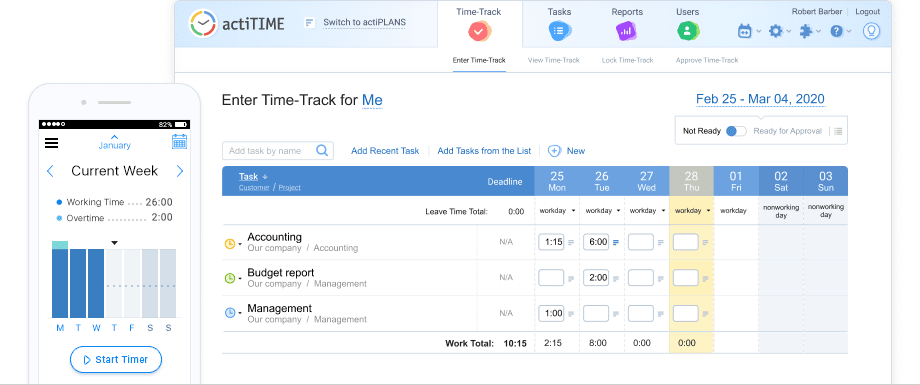
Using these timesheets, employees can track hours against specific tasks, attach comments to their time entries, submit leave requests in a split second, and quickly access essential work-related information by simply clicking on any task in the list.
actiTIME timesheets support manual data entry. However, you can always track time automatically using actiTIME Timer – a Chrome extension that sits in the top corner of your browser and seamlessly integrates into many handy online tools: GitLab, Jira, Google Docs, etc.
Step 2: Review
actiTIME has the timesheet approval functionality that makes it convenient for managers to review and endorse/reject employees’ weekly time tracking data.
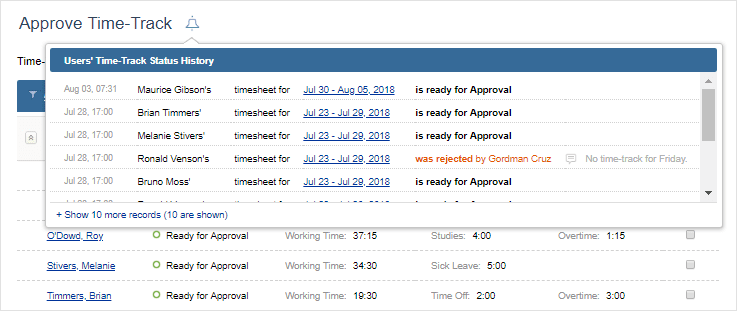
You can easily see which timesheets are ready for approval in the Approve Time-Track interface (it is available to users with special manager permission). There, you can inspect your team members’ time tracking results one by one – click on the link with dates to check out which tasks they worked on during the week and how much time they spent on them.
Besides, the Approve Time-Track Interface allows you to endorse/reject employee timesheets in bulk and see how much leave time each employee took over a workweek. Plus, in case you decide to reject a person’s timesheet, you may explain your reasons for doing so via the time-track rejection comments.
Step 3: Analyze
actiTIME contains a bunch of valuable reports that enable you to take away some important lessons from the collected data and inform decision-making for the better. You can run them to:
- Get an in-depth view of all the time your team members spent on different projects and tasks
- See how much leave time your employees earned and used over a particular period
- Understand how many overtime hours your workers must be compensated for
- Contrast the set task estimates with actual time tracking results
- Monitor project costs and compare them to revenues
- Review comprehensive billing summaries and export this data as invoices
Different Ways to Use Employee Timesheet Data
While a timesheet may still seem like a simple record-keeping method, the data collected from timesheets can serve multiple essential business purposes.
Common Purposes
1. Payroll
It doesn’t matter if you pay employees a fixed sum of money per month or calculate wages on an hourly basis. They are always expected to work a certain amount of time per day, week, and month. Timesheet data helps you see whether your staff abides by these contractual work time requirements and then fairly calculate salaries based on the number of hours tracked.
2. Legal compliance
Overtime laws vary from state to state. You need to know which employees are exempt from them and which are not, what standard workweek duration is accepted in your region, what your overtime pay rate is, etc. And after you get familiar with all the relevant rules and regulations, you need to track the time invested by your team members in work and handle every overtime hour with due care, as required by the law.
Accurate timesheet data is key to error-free overtime pay calculations. It helps you avoid any legal risks and show impeccable compliance with local labor regulations.
3. Attendance and absence management
Daily time tracking is an excellent way to monitor employee attendance. It helps you see whether each team member attends work regularly and whether they invest the necessary amount of time in their job.
Plus, thanks to leave management functionality included in such employee timesheet software as actiTIME, you can keep track of employees’ time off. Check out this post to find out more about this handy functionality, how it works, and which benefits it provides.
4. Billing and invoicing
Online timesheet tools offer an easy way to track billable time and generate professional-looking invoices. For instance, in actiTIME, you can set preferable billing rates for different types of work, and the system will automatically calculate billable amounts for you based on the number of hours invested in disparate services.
Besides, actiTIME allows you to create invoices in merely a few clicks or export all the collected pre-accounting data to QuickBooks for further processing. Here we described how to make the best out of actiTIME-QuickBooks integration and how it helps to make accounting more efficient.
5. Project tracking
The way you utilize your time and money defines project success to a large degree. Hence, it’s pivotal to assign reasonable deadlines and budgets for different project works. And even more so, it’s crucial to do your best to meet them and avoid any schedule and cost overruns.
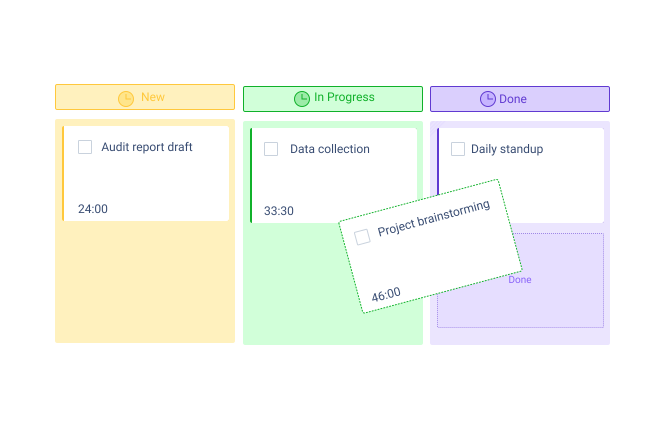
Online timesheet tools come in handy in this regard as well. They let you keep staff-related project costs in check, compare the actual use of time against the set time estimates, and analyze team performance via comprehensive time tracking reports. And if your timesheet tool includes such helpful features as automatic notifications, real-time reporting dashboards, and the Kanban board, managing project progress becomes a breeze.
Uncommon Uses
1. Enhanced Time Estimation
Knowing how much time was invested in different kinds of tasks, you will be able to arrive at more accurate estimates for similar tasks in the future. So, it’s useful to scrutinize timesheet reports for already completed projects when you plan out the new ones. Time tracking data depicted in them is key to better time estimation and superior control over your project and team resources.
2. Performance Benchmarking
Timesheet data can also serve as a foundation for establishing performance benchmarks within an organization. By comparing individual or team productivity against set standards, management can identify high performers as well as those who may need additional support or training.
3. Identifying Training Needs
Trends in time allocation often reveal areas where employees struggle or spend excessive time on specific tasks, highlighting opportunities for targeted training and development initiatives. By identifying skill gaps through timesheet analysis, you’ll be able to select the training programs that enhance employee capabilities and ultimately improve teams’ performance.
4. Work-Life Balance Assessment
Reviewing timesheet data can identify patterns of overwork or excessive overtime and steps to be taken to address potential burnout among employees by implementing flexible work arrangements or encouraging time off.
5. Cost-Benefit Analysis of Projects
And lastly, timesheet data can come in handy for evaluating the profitability of specific projects by comparing the time invested against the revenue generated. and making decisions about continuing, scaling back, or discontinuing certain projects.
Timesheet Management Challenges and Solutions
Now, as we’ve highlighted the numerous benefits of effective timesheet management, it’s important to see how to approach the implementation of a timesheet management system to truly access and maximize these advantages. Here are some common obstacles you may encounter, along with effective solutions to overcome them.
Data Inaccuracies
One of the most prevalent issues with timesheets is the prevalence of errors. And let’s not even talk about the old-school pen and paper methods. We all know that relying on handwritten timesheets is a recipe for errors and confusion.
Even with a digital tracker, employees may forget to log their hours or inaccurately report the time spent on tasks, which may lead to the lack of valid, relevant data you need to make decisions.
Solution:
Ensure that your team members understand what timesheet data is meant for and why it’s vital to fill in timesheets honestly and regularly, and consider choosing an automated time tracking system that allows you to record work hours both with and without relying on manual entry, ensuring a higher level of accuracy and reducing the likelihood of human error.
Delayed Submissions
Studies show that daily timesheets hover around 70% accuracy, while biweekly submissions can plummet to a mere 20%. This leads us to an important point: the frequency of timesheet submissions should align with your business focus. We know that nobody enjoys being closely monitored, but if your goal is to track every minute of your team’s work, then daily submissions are essential. On the other hand, if you’re monitoring project progress based on milestones, you might find it more effective to adjust submission times to align with project phases. This way, you can still keep an eye on resource utilization without overwhelming your team.
Solution: Establish clear deadlines and enforce strict submission policies. Urge and remind employees to fill in their timesheets every day or in accordance with the defined rules.
Resistance to Change
Some employees may perceive timesheets as a form of micromanagement or view daily logging as an additional burden rather than a beneficial tool, especially if the software you choose is overly complex.
Solution: Communicate the advantages of using a timesheet management system. Explain how it can streamline internal operations, prevent burnout, and reduce payroll and client disputes. Provide training sessions to alleviate concerns and ensure all employees feel comfortable using the new system.
Security Concerns
Timesheet data usually contains sensitive information about employees and projects that can harm both your team and spoil your reputation in front of the clients.
Solution: Choose software with robust security features such as user access controls, data encryption, and regular security audits.
Lack of Oversight and Timely Approval
When managing multiple projects and teams, managers often face time constraints that can delay the review and approval of timesheets, especially when they have to do it manually. Not only does this create extra work for all administrative departments, but it can also impact employee morale when staff members don’t receive their pay on time.
Solution: Select the software that offers automated approvals, allows you to assign several approvers in one team, and sends notifications for pending timesheets to streamline the process and keep everything on track.
Integration Issues
Using timesheet software that doesn’t integrate well with existing payroll systems or project management tools can lead to repetitive tasks, inefficiencies, and inaccuracies in payroll calculations.
Solution: When selecting a timesheet tool, ensure it supports seamless integration with your current systems. Test its compatibility during implementation to avoid future issues.
actiTIME is designed to offer all of the solutions we’ve discussed—and even more to let you manage timesheets efficiently, ensuring that it takes no more than 10 minutes (as the stats promise us) per employee for managers to oversee, unless there are critical cases.
If you’re ready to transform your timesheet management into a seamless process and make those statistics a reality in your organization, give actiTIME a try!







![13 Best On-Premises Business Software Tools [2026]](https://www.actitime.com/wp-content/uploads/2020/05/self-hosted-business-products.png)